
Are you having trouble with your DualSense controller not connecting to your Apple Vision Pro after pairing? Don’t worry because we are here to help!
In this guide, we’ll cover easy fixes that will help you to solve the issue of the DualSense Controller not connecting after pairing with Apple Vision Pro.
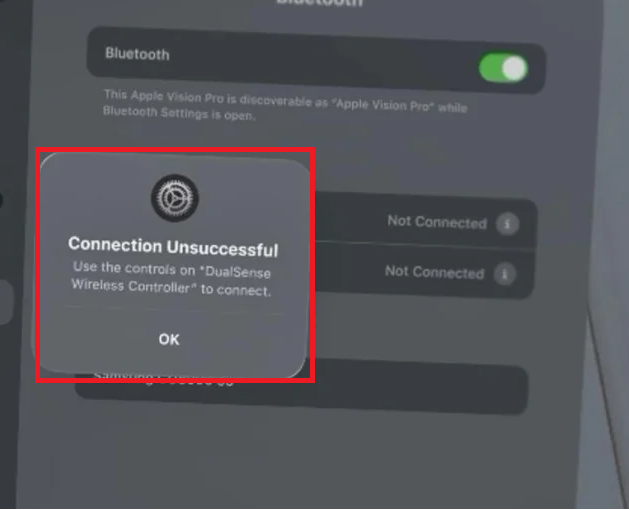
Why is DualSense Controller Not Connecting After Pairing With Apple Vision Pro?
If your DualSense controller is not connecting to your Apple Vision Pro even after pairing, there could be several reasons for this as we have discussed below.
- Bluetooth Interference: Other wireless devices can interfere with the Bluetooth connection. Ensure there are no significant sources of interference between the devices.
- Low Battery: If the DualSense controller’s battery is low, it may have enough power to enter pairing mode but not enough to maintain a connection.
- Software Glitch: Both the Apple Vision Pro and the DualSense controller can experience temporary software glitches that affect connectivity.
- Outdated Firmware: The controller or the Apple Vision Pro may need a firmware update to ensure compatibility and stable connections.
- Distance and Obstructions: Bluetooth has a limited range, and physical obstructions can weaken the signal, causing connection issues.
- Pairing Mode Not Properly Activated: The controller might not have been correctly put into pairing mode, or it may have exited pairing mode before the connection was established.
How To Fix DualSense Controller Not Connecting After Pairing With Apple Vision Pro?
Validate the compatibility of the device, check the charge level, and restart both DualSense controller and Apple Vision Pro. Additionally, you can forget and re-pair the controller to fix the issue.
1. Confirm The Compatibility
First, ensure that your DualSense controller is compatible with your Apple Vision Pro.
The DualSense controller should work with devices that support Bluetooth connectivity and are compatible with the controller’s input protocol.
2. Check the Charge Level
Before proceeding with other troubleshooting steps, check if your DualSense controller has enough charge.
A low battery can sometimes cause connectivity issues. Charge your controller fully before attempting to connect it again.
To check how much charge your Apple Vision Pro’s battery has, simply wear the device and access the Control Center. You’ll find the battery percentage displayed in the upper-right corner of the screen.

3. Restart The Both Devices
A simple restart can often resolve connection issues. Turn off your DualSense controller and the Apple Vision Pro, then turn them back on to see if the controller connects.
4. Forget and Re-pair the DualSense Controller
If a restart doesn’t help, try unpairing the DualSense controller from your Apple Vision Pro:
- Go to the Bluetooth settings on your Apple Vision Pro.
- Find the DualSense controller in the list of devices and choose to “Forget This Device.”
- Put your DualSense controller back into pairing mode by holding down the PS button and the Share button simultaneously until the light bar begins to flash.
- Re-pair the controller by selecting it again in the Bluetooth settings on your Apple Vision Pro.
5. Upgrade The Apple Vision Pro OS
Make sure that you are running the latest OS update of Apple Vision Pro on your device. Sometimes there can be a bug or a glitch issue due to which the DualSense controller might not get connected properly.
Go to Settings > General > Software Update.
6. Contact Apple Support

If none of the fixes above can help you then you need to contact Apple Support and talk to them regarding your DualSense controller not connecting.
Make sure to provide all the information that they ask for and they will be able to guide you in solving the issue.
