
Changing the language in Meta Business Suite is essential for reaching a diverse audience and enhancing user experience.
Whether for expanding your business reach or personal preference, understanding the process of language modification is valuable.
By following simple steps within the platform’s settings, you can seamlessly switch to your preferred language, ensuring effective communication and navigation.
Steps to Change Language in Meta Business Suite
If you’re using Meta Business Suite and want to change the language, you can easily do so by following these simple steps:
- First, log in to your Meta Business Suite account.
- Next, click on the “Settings” option located in the top right corner of the screen.
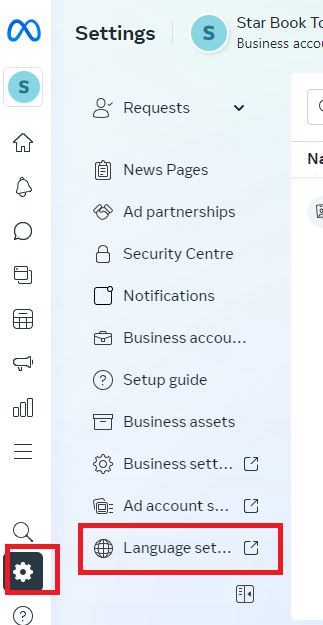
- From there, select “Language” from the drop-down menu.
- You’ll then be able to select your preferred language from the list of available options by selecting Edit.
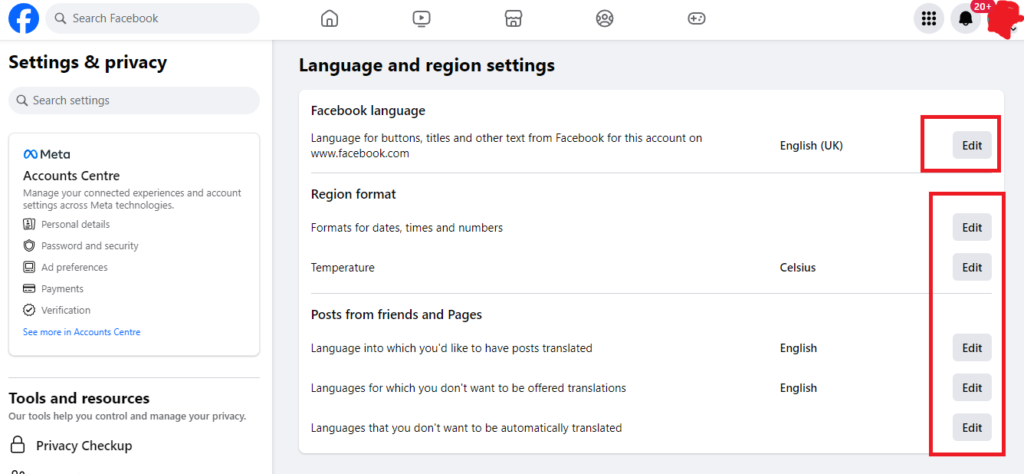
- Once you’ve selected your preferred language, click “Save Changes” to apply the changes.
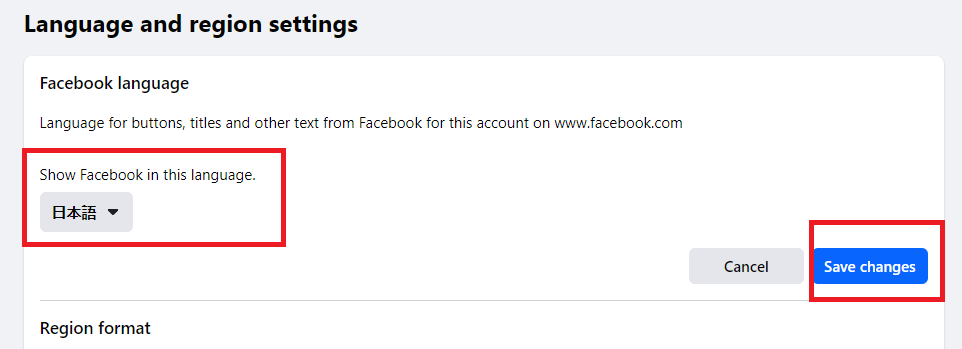
Note: Changing the language setting in Meta Business Suite will affect the language of the entire platform, including all menus, options, and messages. Additionally, some features may not be available in all languages.
If you’re having trouble finding the language settings in Meta Business Suite, you can refer to the official Meta Business Suite help page here for more detailed instructions.
