Are you looking to take control of your Apple Vision Pro’s Do Not Disturb Focus mode?
With the latest update, Apple has made it easier to manage this feature right from your Control Center.
In this article, we will guide you through the simple steps to turn on or off Do Not Disturb Focus mode using the Control Center.
How to Turn On/Off Do Not Disturb Focus Mode in Control Center?
To turn on/off Do Not Disturb focus mode in control center: Glance at the green dot to open Control Center, tap the crescent moon icon to toggle Do Not Disturb, and press and hold to customize settings.
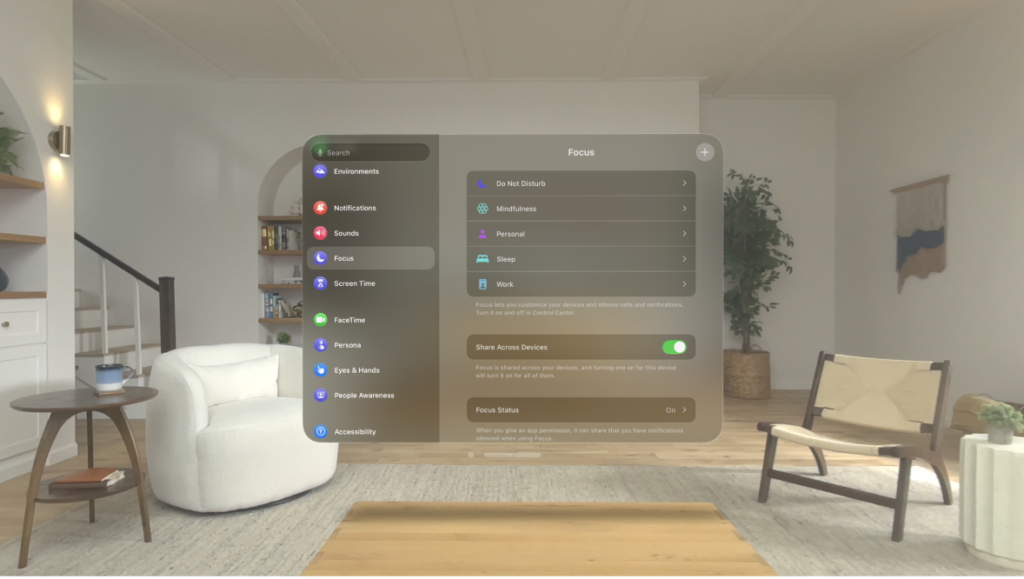
Down below, we have discussed this in step-by-step detail.
Step 1: Access Control Center
With your Apple Vision Pro on, simply glance upwards to the green dot to activate the Control Center.
Step 2: Activate Do Not Disturb
In the Control Center, you’ll see the Do Not Disturb icon, which is usually represented by a crescent moon. Tap this icon to enable Do Not Disturb mode.
Step 3: Customize Your Focus
If you press and hold the Do Not Disturb icon, you’ll be able to select more specific settings.
This is where you can choose to allow notifications from certain contacts or set automated rules for when Do Not Disturb should activate.
